How to print your stamp
Your stamp is four parts: a head, a face pad, a cover and a handle. You print them on a 3D printer, glue the face pad into the head, put them together and start stamping. Nothing needs supports.
What you get
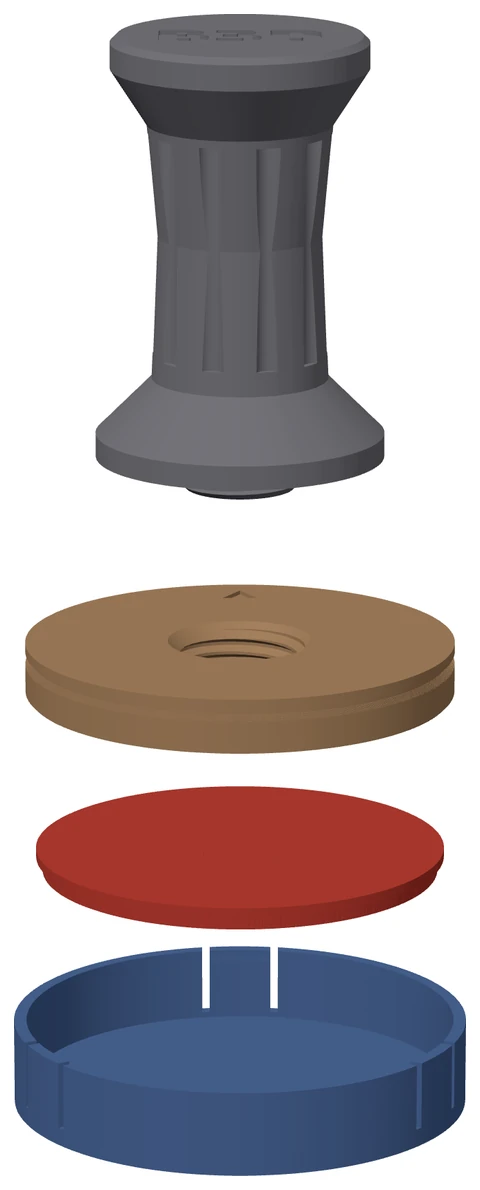
A stamp is made of four parts.
- Head. A firm plate with a shallow pocket in its face and a threaded hole in the back.
- Face pad. The raised picture on a thin base, printed in soft TPU and glued into the pocket. The picture is mirrored on purpose, so it stamps the right way round.
- Cover. Snaps over the face to keep it clean and keep ink off other things.
- Handle. Screws into the back of the head. One handle fits every head, so you print it once.
The app gives you three files to download. Download stamp offers the first two.
- Head and cover. Side by side, in one 3MF file.
- Face pad. In its own 3MF file, so you can print it in TPU on its own.
- Download handle. The handle, in its own 3MF file.
In every file the parts are already the right way up for printing, so you do not need to turn them over in your slicer.
You can download a stamp made from your own picture. The ready-made stamps on the page are for show.
Before you print
- A 3D printer that prints in plastic (an FDM printer), with a 0.4 mm nozzle.
- The stamp was tuned on a Bambu P1S. Other printers can work too. If a fit is off, see If it does not fit.
- TPU 95A for the face pad. It is soft, so the face inks and presses evenly.
- PETG or PLA for the head, the cover and the handle.
- Print TPU slowly. Your slicer's own TPU settings are a good start.
- If you chose the 0.2 mm nozzle for the face pad, print only the face pad with it. Bambu Lab does not recommend TPU with a 0.2 mm nozzle, so print a small one first. Set your slicer's maximum volumetric speed to 2 to 3 mm³/s, turn retraction off (or 0.8 mm at most), use 0.08 to 0.12 mm layers, and feed the TPU from the external spool, not the AMS.
- Flexible super glue (a rubber-toughened super glue) to fix the face pad into the head.
- A slicer that opens 3MF files.
- No supports. Nothing on a stamp needs them.
Settings for each part
Use these settings for each part.
| Face pad | Head | Cover | Handle | |
|---|---|---|---|---|
| Orientation | Flat base on the bed, picture up | Face up, back on the bed | Lid down, walls rising | Flat top on the bed, stud pointing up |
| Layer height | 0.12 to 0.16 mm | 0.2 mm | 0.2 mm | 0.2 mm |
| Ironing | Off | Not set | Not set | Not set |
| Material | TPU 95A | PETG preferred | PETG preferred | PLA |
| Supports | None | |||
| Walls | 3 to 4 | |||
| Infill | 15 to 20 % gyroid | |||
A dash means we do not ask for it.
Why they print this way up
- Face pad, picture up. The edges of the picture print crisp, and the flat base grips the bed.
- Head, face up. The pocket's floor prints flat. The hole in the back prints as a bridge about 16 mm across, so it needs no supports.
- Cover, lid down. The snap hooks end up at the top of the print, and their 45 degree underside holds itself up.
- Handle, top down. The flat top grips the bed best. The thread prints upright at the top.
Print a test first
Before you print a lot of stamps, print a small one. Make a small round stamp, about 40 mm across. Print its head, face pad and cover, and print the handle.
This checks the fits that depend on your printer: the thread, the snap and the pocket. If the handle screws in, the cover clicks on and the face pad drops into the pocket, go ahead with the rest.
You only print the handle once. Keep it for every other stamp.
Putting it together
- Put a thin layer of flexible super glue on the floor of the pocket in the head.
- Press the face pad in, picture outwards, with the top of the picture at the small notch in the head's rim. Hold it for 30 seconds, then leave it to set before you stamp.
- Screw the handle into the head until its wide base (the flange) sits flat against the back.
- Push the cover on over the face until it clicks.
The small arrow on the back of the head points to the top of the picture. It shows you which way up the stamp is, however far round the handle stopped.
A firm pull takes the cover off again.
Inking and stamping
- Ink the face lightly, then press straight down on the handle.
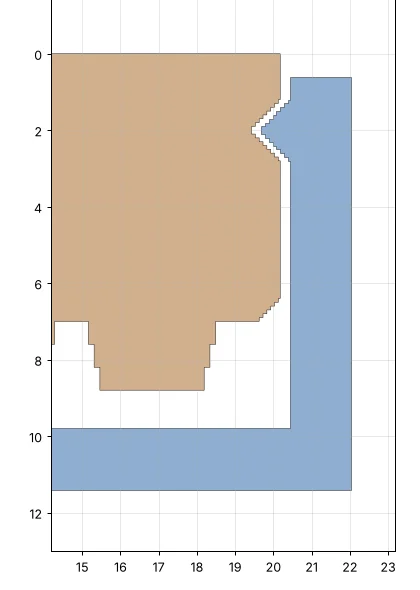
- The picture stands 1.8 mm tall, enough that the plate does not touch the ink on uneven board.
- The cover sits 1 mm above the picture, so wet ink never touches it.
- In your own picture, every line and every gap is at least 0.4 mm. Thin lines are made thicker, not left out. What it prints shows what your nozzle makes of it: with a 0.4 mm nozzle, gaps under 0.8 mm fill in.
- For a photo, make the stamp 50 to 60 mm. For words, use the Bold look and keep the letters at least 4 mm tall.
- Small gaps can fill with ink on kraft board. If they do, use a less loaded ink pad.
Ink pads that work
- Tsukineko VersaFine Clair. An oil-based ink that dries quickly and keeps fine lines crisp. Its pad is 76 × 35 mm, so press a bigger stamp on it a few times, turning it each time, until the whole face is inked.
- Tsukineko StazOn. A solvent ink that also stamps on plastic, glass and metal. Clean the face pad straight after stamping, with StazOn cleaner. Solvent ink left on TPU can wear it down over time.
If something does not fit
Every printer is a little different. Change one thing at a time, and reprint only the part that is wrong. The app has no setting for fit, so you make these changes in your slicer.
- The cover is too tight or too loose. PETG gives the snap hooks the most flex, so use it if you can. Then try a small change to your slicer's horizontal expansion (also called XY size compensation), about 0.05 mm at a time, and reprint the cover.
- The handle is stiff or wobbles in the head. The thread is made with 0.30 mm of room, the usual safe value for a 0.4 mm nozzle. Try the same small change to horizontal expansion, about 0.05 mm at a time, and reprint the handle.
- The face pad is tight or loose in the pocket. It is made 0.15 mm smaller all round, to leave room for the glue. Try the same small change to horizontal expansion on the face pad.
- The face looks ragged. Try 0.12 mm layers, and print the face pad more slowly.
- Ink fills small gaps. See Inking and stamping.
Looking after your stamp
- Put the cover back on when you have finished. It keeps the face clean.
- The cover comes off with a firm pull, so it can go on and off each time you stamp.
- The handle fits every head. Unscrew it to use it on another stamp.
- If the face pad comes away, clean off the old glue and glue it back in the same way.
Ready to make your own?
Drop in a photo and get a stamp you can print.
Make a stamp